
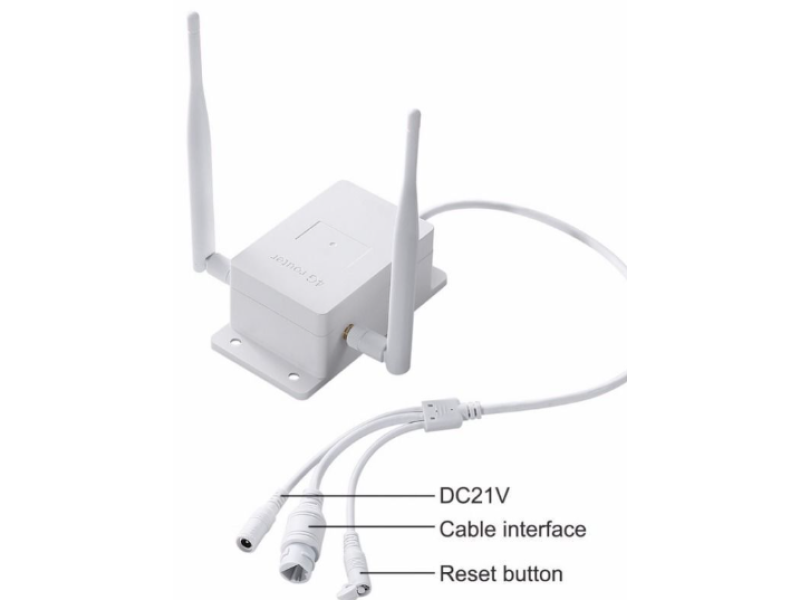
📶 Routers for Video Surveillance with 3G/4G Modems
Internet access today is as essential as a 120-volt outlet in every American home. With nearly universal cellular coverage, staying connected is a given-even on an airplane or the International Space Station. Yet when it comes to remote locations like cabins or country homes, reliable connectivity can be a challenge. For those using WiFi surveillance cameras or needing remote access, a router is a vital component of your security system.
At safsale.com, we provide advanced routers equipped with 3G/4G modems that are engineered to meet American standards. This guide will explore typical scenarios and equipment configurations, helping you choose and set up a router that meets your video surveillance needs.
🔍 What Is a Router and How Does It Work?
A router, technically known as a network router, is a device that distributes a central internet signal among multiple devices-much like a power strip distributes 120 volts to various outlets. It “sorts” connected devices by assigning each a unique IP address, enabling both targeted and group data transmission.
- Wired Connections:
Routers use Ethernet cables (typically UTP or FTP-twisted pair cables, with “F” indicating shielding) to deliver high-speed data. - Wireless (WiFi) Connections:
Routers also broadcast WiFi signals, allowing devices like smartphones, tablets, laptops, and smart TVs to connect without physical cables.
🌐 Configurations for Surveillance Applications
1. For Local WiFi Video Surveillance
- Usage:
When using WiFi IP cameras for a home, cabin, or apartment, any router that provides sufficient throughput for the combined data streams will work. - Setup:
In each camera’s settings, you’ll need to enter your WiFi network’s name (SSID) and password-these are available in your router’s configuration. - Networking Essentials:
Familiarize yourself with basic network concepts like IP address, subnet mask, and gateway. Modern routers support DHCP (automatic IP assignment), so simply check the corresponding boxes in both your router and camera settings. - Additional Tips:
If your existing router lacks available Ethernet ports, a network hub or switch can serve as a splitter.
2. For Remote Video Surveillance via Wired Internet
- Usage:
In environments where wired internet is available-such as in many urban apartments-a traditional router will suffice. - IP Addressing:
Ensure that your IP cameras are in the same subnet as your router (commonly, the router has an IP of 192.168.1.1, and cameras are set to 192.168.1.x, with the subnet mask 255.255.255.0). - Cloud Integration:
Register your cameras or DVR with a cloud service for remote viewing using online guides provided by your service provider. This step minimizes the need for complex port forwarding and static IP configurations.
3. For Remote Locations Without Wired Internet
- Equipment Required:
For a remote property (such as a cabin) without access to cable or fiber, a router with an integrated 3G or 4G modem is the solution. - Hybrid Routers:
These routers combine a cellular modem with WiFi capabilities, allowing you to access the internet via a SIM card from major carriers like AT&T, Verizon, T-Mobile, or Sprint. - Performance:
- 3G speeds: Up to 3.6 Mbps
- 4G speeds: Up to 100 Mbps
- Installation:
The mobile router is compact-often resembling a USB flash drive-and can be powered by a smartphone charger (look for a power supply delivering at least 1.5 amps). With an inserted SIM card on a data plan, the device provides WiFi connectivity for your video surveillance system.
⚙️ Important Considerations & Best Practices
- Signal Strength & Coverage:
If your location suffers from a weak GSM signal, consider installing an external directional antenna or a cellular signal booster to ensure reliable connectivity. - Placement:
For rural homes, position your router near a window or mount it on an exterior wall to maximize reception. For multi-room setups, central placement is ideal. - Security & Configuration:
Always set a strong WiFi password to prevent unauthorized access. Modern routers support automatic IP assignment (DHCP) and allow manual configuration if needed. - Firmware Updates:
Regularly update your router’s firmware from the manufacturer’s website to maintain security and performance. - Integration:
If possible, use a unified system where your router, cameras, and any additional network hardware (like switches or hubs) are all compatible and optimized to work together.
🎯 Conclusion
A WiFi router with an integrated 3G/4G modem is a versatile solution for video surveillance, whether in a city apartment or a remote cabin. By understanding how routers distribute data, managing IP addressing, and selecting the right equipment for your environment, you can ensure a stable and secure network for your IP cameras and remote monitoring needs.
At safsale.com, we offer top-quality routers and wireless devices designed to meet American standards. Upgrade your surveillance system today for faster, more reliable connectivity-anywhere, anytime 🚀📶🔧
Explore our range now and experience unparalleled wireless internet and security performance!