
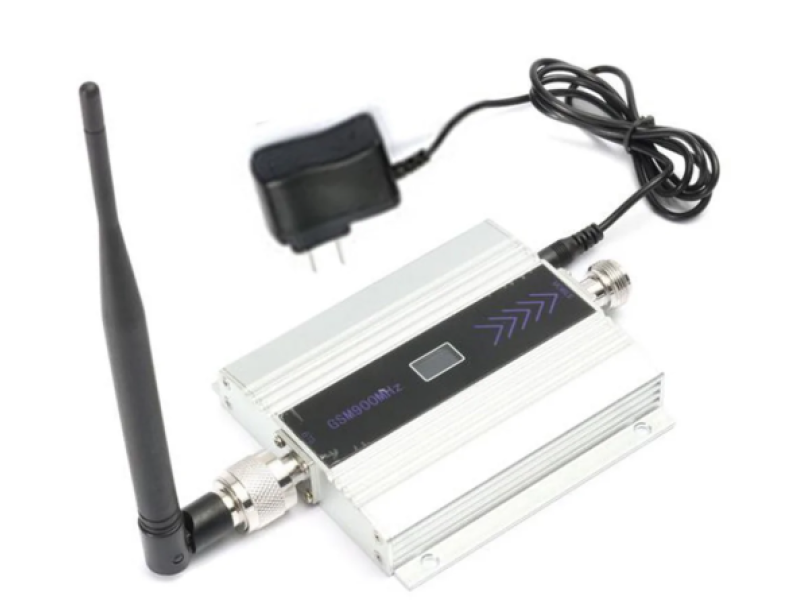
📡 GSM Signal Antennas for Enhanced Mobile Connectivity
In urban areas, high levels of radio noise and physical obstructions can weaken mobile signals. This problem is even more pronounced in rural settings-like at your cabin or country house-where you may experience slow, unreliable internet. A high-quality external GSM signal antenna can dramatically improve your mobile internet reception, ensuring reliable connectivity regardless of location.
At safsale.com, we offer GSM antennas engineered to meet American standards for 2G, 3G, and 4G (LTE) networks. Read on to learn about the construction, selection criteria, installation, and proper connection of GSM antennas for your home or rural property.
🔍 Overview & Construction of GSM Antennas
GSM antennas are transceiver devices designed to both receive and transmit cellular signals. They play a critical role in boosting the signal from distant cell towers, helping overcome obstacles such as brick walls, trees, or other urban clutter.
Key Construction Types:
Yagi (“Wave Channel”) Antennas
- Design: A Yagi antenna features a central active element (the driven element) mounted alongside a reflector and one or more directors.
- Performance: The more directors, the higher the gain-often between 5 to 20 dB-but this comes at the cost of a narrower beamwidth (as low as 15°-20°), requiring precise alignment.
Panel Antennas
- Design: These are flat, compact antennas with the radiating element integrated inside a reflector.
- Performance: They typically provide a moderate gain (5-10 dB) with a wider beamwidth (around 40°-60°), making them easier to install and align without precision adjustments.
- Consideration: While offering ease of use, their large surface area may be more susceptible to wind loads.
Rod (Monopole) Antennas
- Design: A simple vertical “stick” antenna with an omnidirectional pattern in the horizontal plane.
- Usage: Although they do not boost the signal (gain is minimal), they serve well as supplemental boosters when the indoor environment severely attenuates the signal.
🔧 How to Choose the Right GSM Antenna
When selecting a GSM antenna, consider the following:
1. Frequency Compatibility
Mobile operators in the USA typically use these frequency bands:
- 2G: 900 MHz and 1800 MHz
- 3G: 900 MHz and 2100 MHz
- 4G (LTE): 800 MHz, 1800 MHz, and 2600 MHz
Since these frequencies differ significantly, a narrowband antenna cannot effectively cover all bands. Identify which frequency provides the strongest signal in your area using a smartphone app like “GSM Signal Monitoring.” Signal strength is typically indicated in dBm; lower values (closer to -50 dBm) represent a stronger signal compared to weaker levels (e.g., -113 dBm).
2. Environmental Factors
- Location:
Assess your property for obstructions. For instance, if your house is in a densely built area, mounting the antenna near a window or on a roof can vastly improve reception. - Mounting Height:
The higher the antenna is placed, the better its line-of-sight with the cell tower-ideally, on a mast or high rooftop.
3. Build Quality
- Materials:
Look for antennas constructed from durable materials such as aluminum or galvanized steel to prevent corrosion. - Connector Compatibility:
Ensure the antenna’s connectors match the coaxial cable used. In the U.S., use a cable with a 50-ohm characteristic impedance for GSM applications. High-quality connectors (or pig-tail adapters) are essential to minimize signal loss.
🔧 Installation and Setup
Mounting the Antenna
- Select an Optimal Location:
Mount your antenna as high as possible-preferably on a rooftop or a dedicated mast-to ensure a clear line-of-sight with the nearest cell tower. - Ensure Stability:
Use robust brackets or clamps designed for outdoor conditions to prevent movement due to wind. Adjust the angle carefully to point directly toward the base station. - Allow for Adjustment:
Initially, mount the antenna on a rotatable mast (without rigid fixing) so you can fine-tune its orientation. Once the best signal is found, secure the position firmly.
Connecting the Antenna
- Use High-Quality Coaxial Cable:
Connect the antenna to your GSM modem, repeater, or router using a 50-ohm coaxial cable (such as RG-6 variants recommended by top manufacturers). - Minimize Cable Loss:
Keep the cable length as short as practical to reduce signal attenuation. Every connector or splice (e.g., using pig-tails) introduces additional loss. - Secure Connections:
Ensure that all connectors and cable joints are properly insulated (using heat-shrink tubing, for example) to prevent moisture ingress and further signal degradation.
🚀 Enhancing Mobile Internet Performance
A well-installed GSM antenna can transform your mobile internet experience, particularly in areas where the built-in antenna in your smartphone or modem struggles to pick up a weak signal. By boosting the signal strength, you benefit from:
- Faster Data Speeds:
Improved reception leads to higher data throughput. - Reduced Latency:
A stronger signal minimizes delays, essential for real-time applications like video streaming or remote monitoring. - Greater Reliability:
Enjoy consistent connectivity even in remote or obstructed environments.
🎯 Conclusion
Improving your mobile internet reception on your home or rural property is achievable with the right GSM signal antenna. By carefully evaluating frequency requirements, environmental conditions, and build quality-and by following best practices for installation and connection-you can significantly boost your connectivity.
At safsale.com, we offer GSM antennas that meet rigorous American standards, ensuring reliable, high-performance mobile internet for homes, cabins, and rural properties. Upgrade your network today and experience enhanced connectivity, even where the signal is weak 🚀📶🔧
Explore our range now and transform your mobile internet experience!