
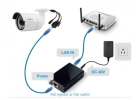
איך לחבר מצלמות מעקב
מצלמות מעקב יכולות להיות מחוברות למכשירים שונים באמצעות שיטות שונות. הנה סקירה כללית של אפשרויות חיבור עבור אנלוגי ו-מצלמות IP.
מחבר מצלמה דרך האינטרנט
חיבור מצלמת מעקב לאינטרנט מאפשר ניטור מרחוק. אפשרויות כוללות:
קשר ישיר עם מצלמת IP:
- חבר את ה-camera ל-a router באמצעות Ethernet או WiFi.
- הגדרות העברת יציאה על הנתב.
- גישה למצלמה באמצעות כתובת IP בדפדפן (דורשת התקנה סטטית IP או DNS דינמית).
דרך a מוקלט וידאו:
- חבר מצלמות אנלוגיות למכשיר הקלטה.
- לקשר את הרשמקול לנתב לגישה לאינטרנט.
שירותי ענן:
- השתמש במצלמות תואמות ענן לגישה מרחוק פשוטה.
- עקוב אחר הוראות ההתקנה של ספק השירות לאינטגרציה.
מתחבר לPC
אתה יכול לחבר מצלמות למחשב נייד לצפייה חיה או הקלטה:
באמצעות כרטיס לכידת וידאו:
- תתקין כרטיס לכידת במחשב שלך.
- לחבר מצלמות לכרטיס באמצעות מחברים BNC.
- התקן את תוכנת הניהול של הקרן לניהול וידאו.
באמצעות ממיר USB:
- השתמש בממיר BNC-to-USB.
- התקן תוכנה תואמת להזרמת וידאו בסיסית.
חיבור למוניטור או לטלוויזיה
חיבור למוניטור:
- השתמש במוניטור עם קלט מורכב או ממיר VGA.
- חבר את פלט הווידאו של המצלמה למוניטור באמצעות מתאם BNC-to-VGA.
חיבור טלוויזיה:
- השתמשי בטלוויזיה עם קלטים של RCA.
- צור מתאם BNC-to-RCA או להשתמש בכבלים שהוכנו מראש.
- הגדר את הטלוויזיה לקלט AV המתאים לצפייה חיה.
טיפים לחיבורים מצליחים
- כבלים: השתמש בקוויאלי באיכות גבוהה או כבלי אתרנט כדי להבטיח שידור אות יציב.
- מתאם: בחר מתאם תואם לחיבוריות חלקה.
- ספק כוח: ודא שהמצלמה מקבלת כוח תקין מפרט המצלמה.
- תוכנה: השתמש בתוכנה מותאמת ליצרן לצורך תצורה ומעקב.
מסקנה
חיבור מצלמות מעקב למכשירים שונים הוא ישיר עם הכבלים הנכונים, המתאמים, והוראות ההתקנה. בין אם אתה שואף למעקב באינטרנט, להקלטה ממוחשבת, או לשידור חי בטלוויזיה, המדריך הזה מפשט את התהליך.

מדריך 10/23/2026
82
Connecting Security Cameras to Monitors, TVs, Computers, and Multiple Displays
Security video can be viewed on a dedicated monitor, a television, a computer, a tablet, or a phone. The connection method depends on the signal the camera produces and the equipment that receives it. A connector that physically fits does not necessarily carry a compatible signal.
Before buying a sc..
קרא מאמר

מדריך 10/23/2026
54
How to Connect an IP Security Camera: Planning, Wiring, and Setup
A small camera system can help you check an entrance, review an incident, or keep an eye on pets while you are away. Connecting it successfully involves more than making a live picture appear. The camera needs suitable power, a reliable network path, secure credentials, and a recording destination t..
קרא מאמר

מדריך 10/23/2026
49
Connecting a Hikvision Camera Microphone: Audio, Network, and Remote Access
Video shows where an incident happened, but useful sounds may explain what the picture leaves out. A call for help, breaking glass, or a conversation can add context to an authorized security recording. Adding a microphone to a compatible Hikvision camera or recorder therefore starts with two questi..
קרא מאמר

מדריך 10/23/2026
46
איך לבחור PoE מתג רשת למצלמות אבטחה
A network switch connects IP cameras with recorders, servers, and viewing stations. A PoE switch can also power compatible cameras through the same Ethernet cable. Selecting the right model means checking two systems at once: the network that carries video and the electrical budget that keeps the ca..
קרא מאמר

מדריך 10/23/2026
52
Eight-Port PoE Switches: Power Budgets, Uplinks, and Lessons from Six Models
Power over Ethernet carries data and electrical power over compatible Ethernet cabling. For cameras, wireless access points, and IP phones, it can reduce separate power wiring and consolidate backup power at the network equipment. The switch still needs an appropriate power source, and its capacity ..
קרא מאמר

מדריך 10/23/2026
54
Connecting an EZVIZ Camera to a HiWatch Recorder
An EZVIZ camera can be added to a HiWatch recorder only when the particular camera and recorder support a compatible local connection. Brand names alone are not enough to establish this. A camera that works in the EZVIZ mobile app may still lack the stream, protocol, or operating mode needed by a th..
קרא מאמר

מדריך 10/22/2026
45
Choosing Twisted-Pair Cable for Security Cameras
The cable is part of the surveillance system, not just a way to connect its components. Poor cable selection or termination can cause dropped video, intermittent camera restarts, and difficult maintenance. Choose the cable for the camera interface, route length, environment, and power requirements b..
קרא מאמר

מדריך 10/22/2026
47
How to Connect an IP Camera to an NVR and Verify Recording
Connecting a camera to a network video recorder is only the beginning of setup. A complete installation must deliver a stable live image, save footage on the intended schedule, retain it for the required period, and allow an authorized user to play back and export a recording. Treat those as separat..
קרא מאמר

מדריך 10/22/2026
49
בחירת מחברי מצלמת אבטחה: BNC, אתרנט, וכוח
A reliable surveillance connection depends on the cable, connector, termination, power source, and environment working together. A loose or corroded contact can cause intermittent video or power loss even when the camera itself is healthy. Choosing the right connector begins with the equipment's act..
קרא מאמר

מדריך 10/22/2026
53
Connecting Security Cameras: Ethernet, PoE, Wi-Fi, and Coax
Connecting security cameras involves three separate paths: power, video or network data, and the viewing or recording destination. The exact arrangement depends on the camera, recorder, cable, and site. Begin with the manufacturer's documentation for the specific models rather than treating all conn..
קרא מאמר

מדריך 10/22/2026
49
Connect a Compatible HiWatch Camera to Your Phone
A compatible HiWatch camera can often be viewed from a phone through the supported Hik-Connect service or another connection method documented for the model. Start by checking the exact camera, firmware, and regional support information. Branding alone does not guarantee that every model uses the sa..
קרא מאמר

מדריך 10/22/2026
44
Choosing Cable for Outdoor Security Cameras
Outdoor cameras depend on a reliable cable path as much as on the camera itself. The cable must carry the required signal, support the power design where applicable, and survive its installation environment. A cable that works briefly on a workbench may fail after exposure to sunlight, water, moveme..
קרא מאמר

מדריך 10/22/2026
64
Set Up an iCSee-Compatible Security Camera
iCSee is used with compatible connected cameras, but installing the app does not make every IP camera compatible with it. Before setup, confirm that the camera's manual identifies iCSee as a supported application and describes the correct pairing method for that model.
Menu names, account requiremen..
קרא מאמר

מדריך 10/22/2026
56
Adding a Hikvision IP Camera to a VMS over Ethernet or Wi-Fi
Adding a Hikvision IP camera to a video management system, or VMS, requires three working layers: the camera must be powered and reachable, the integration method must be supported, and recording must be configured separately from live viewing. The process is similar for Ethernet and Wi-Fi cameras, ..
קרא מאמר

מדריך 10/22/2026
49
How to Connect an Analog Security Camera to a Recorder, TV, or Computer
An analog security camera can feed a recorder, a compatible display, or a computer through the appropriate capture hardware. The correct connection depends on its video format and the device receiving the signal. A matching connector is only the beginning: standard composite video, HD-TVI, HD-CVI, a..
קרא מאמר

מדריך 10/22/2026
51
Choosing a PoE Network Switch for a Security Camera System
A network switch connects IP cameras, recorders, and viewing computers so they can exchange data on a local network. A Power over Ethernet, or PoE, switch can also supply compatible cameras through the same cable used for data. Choosing it correctly means checking two separate requirements: how much..
קרא מאמר

מדריך 10/22/2026
51
בחירת כבל למצלמות אבטחה: לפתות, אתרנט, כוח וסיבים
Camera cable has to carry the right signal, deliver adequate power where required, and survive the installation environment. Choosing it only by price or appearance can produce intermittent video, nighttime power failures, or a costly replacement after the cable has been concealed.
Begin with the sy..
קרא מאמר

מדריך 10/22/2026
60
Connect an IP Security Camera to a Computer and Set Up Recording
Network and video connections used in surveillance equipmentA computer can display video from an IP security camera and, with suitable software, record it. The camera usually connects through the local network rather than through a video input on the computer. Decide whether the computer will be a v..
קרא מאמר

מדריך 10/22/2026
75
Connect a Hikvision IP Camera to a Dahua NVR Using ONVIF
Recorder and Hikvision camera illustrating a mixed-brand systemA Hikvision IP camera can often supply video to a compatible Dahua NVR through ONVIF, but the brands alone do not establish compatibility. Check the exact models, firmware, supported profiles, and recorder limits. Basic video may work ev..
קרא מאמר

מדריך 10/22/2026
68
Connect a Hikvision Wi-Fi Camera: Network Setup and Troubleshooting
Illustrative compact Hikvision network cameraWi-Fi can reduce the amount of data cabling needed for a security camera, but the installation still depends on power, wireless coverage, and a compatible camera. A convenient mounting location is useful only if the camera can maintain the required video ..
קרא מאמר

מדריך 10/22/2026
62
Connect a HiWatch IP Camera to an ONVIF Recorder
HiWatch dome-style IP cameraA HiWatch IP camera may work with a compatible third-party recorder, including an RVi model, when the devices share supported video and control protocols. The brand combination alone does not guarantee compatibility. Confirm the exact camera and recorder models, firmware,..
קרא מאמר

מדריך 10/22/2026
56
How to View a HiWatch Security Camera on a TV
HiWatch bullet-style security cameraA television can display live or recorded security video in a home, office, or warehouse. The connection depends on the camera's signal type and the television's supported inputs. A camera brand name alone does not establish compatibility, and a larger screen does..
קרא מאמר

מדריך 10/22/2026
58
How to Connect and Activate a Hikvision IP Camera
Hikvision bullet-style network cameraConnecting a Hikvision IP camera involves three separate tasks: supplying the correct power, establishing a network connection, and activating the device securely. Recording and remote access come afterward. A network video recorder is one possible recording dest..
קרא מאמר

מדריך 10/22/2026
60
How to Set Up a Dahua IP Camera with ConfigTool
Dahua dome-style network cameraA Dahua IP camera needs a suitable power source, a working network connection, secure activation, and a configured recording destination. A live picture confirms only part of that setup. The steps below separate those tasks so that an address change or browser setting ..
קרא מאמר
Showing 1 to 24 of 36 (2 Pages)